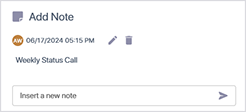
Add a Note to an Active Call
You can attach notes to Active calls containing any text or keywords that may later assist to identify the call when specifying search criteria (see Filter Interactions ).
| ➢ | To attach notes: |
| 1. | In the Icon pane, click  or or  , and then click the note icon adjacent to the active call for which you wish to attach a note. , and then click the note icon adjacent to the active call for which you wish to attach a note. |


| 2. | Click the arrow adjacent to the note text that you entered. |